Security and Compliance

Nomos GRC

Security and compliance, side by side.

Nomos GRC™ brings the security alerts from every one of your repositories into one place, and keeps your compliance program right beside them: audits and evidence, controls, policies, risks and vendors. Assign the work, follow every alert from first seen to fixed, and keep a permanent record for your next audit. It’s invitation-only for now.

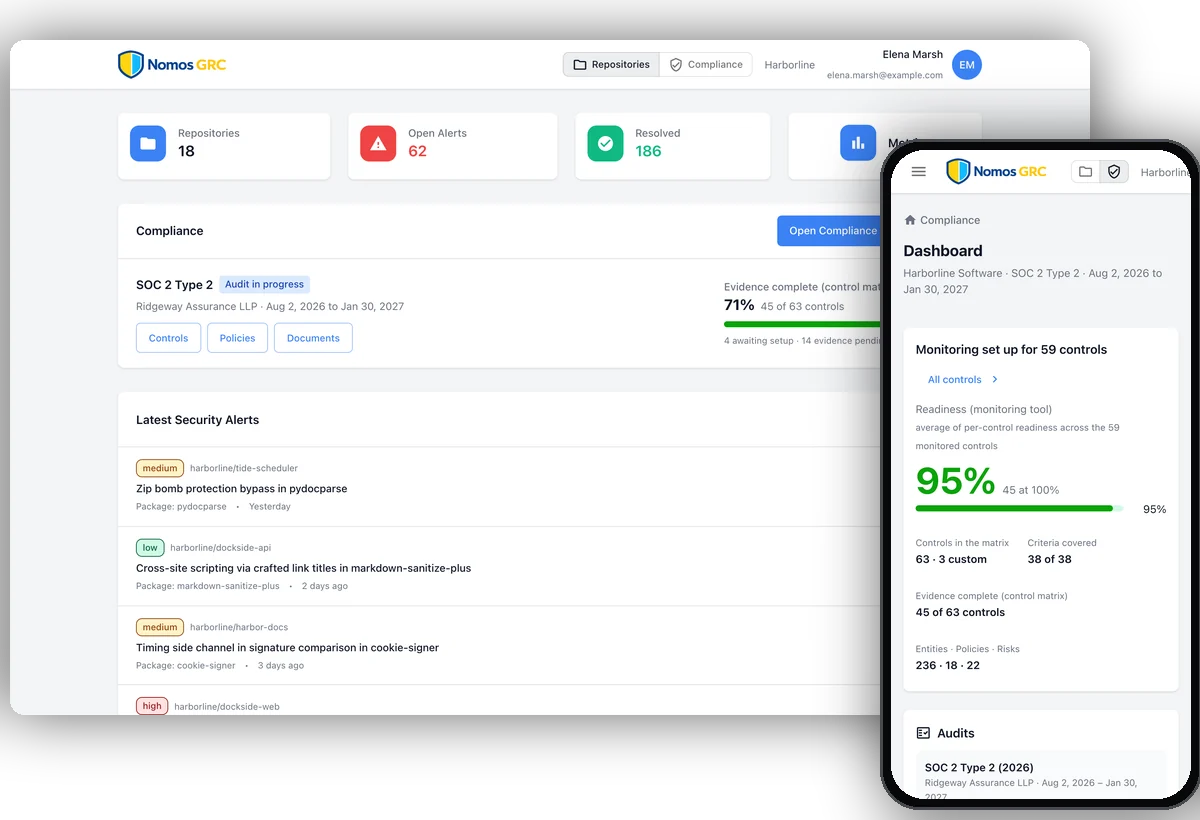
Nomos GRC on a computer showing the dashboard for a demo company, and on a phone showing its alerts
2 ModesRepositories and Compliance
Every 2 HrsAlerts Synced From GitHub
DailyDigest by Email
ForeverAudit Log of Every Change
How It Works

Connect, Fix, Prove It

From scattered alerts to a record your auditor can follow.

  1. 1. ConnectYour Repositories

    Add your GitHub organizations and accounts. Nomos GRC pulls every repository’s Dependabot alerts and keeps them in sync, with a Refresh whenever you want the latest.

  2. 2. Assign and FixPut Alerts in Front of the Right People

    Sort repositories by alerts and severity, assign them to your team, and follow each alert from first seen to fixed or dismissed.

  3. 3. Prove ItShow Your Auditor the Record

    Keep your framework’s controls, evidence, policies and risks beside the security work, with a history of every change for the next audit.

Take the Tour

See Nomos GRC at Work

A look around a demo company with made-up repositories, alerts, controls and numbers. Open any screenshot to see it full size.

The Nomos GRC dashboard for a demo company, with sample data: 18 repositories, 62 open and 186 resolved alerts, a SOC 2 audit in progress and the latest security alerts
Dashboard

Your Security Posture at a Glance

Repositories, open and resolved alerts, the latest alerts as they arrive, and where your audit stands, on the first screen you see.
The Nomos GRC repository list for a demo company, with sample data: repositories with their alert counts by severity, language, owner and last update
Repositories

Every Repository, Sorted by What Matters

Search, filter by severity and sort by alerts, severity, name or last update. Starred repositories come first, and each one shows its alert counts and its owner.

Dependabot alerts for one demo repository in Nomos GRC, with sample data: 12 alerts by severity, each with its advisory, package, affected range and fixed version
Alerts

Every Alert, With What to Do About It

Each repository’s Dependabot alerts with the package, severity, advisory and the version that fixes it, refreshed from GitHub with a click.

The Nomos GRC compliance dashboard for a demo company, with sample data: a SOC 2 Type 2 audit in evidence collection, readiness, tasks and readiness by area
Compliance

Your Compliance Program in One Place

Switch to Compliance for the audit in progress, readiness, and the way into audits, policies, risks, controls and the rest of your program.

A demo SOC 2 control matrix in Nomos GRC, with sample data: evidence by criteria area and controls with their criteria, readiness and evidence
Controls

The Control Matrix, With Its Evidence

Every control with its statement, the criteria it covers, the evidence behind it and its status. Sort, filter and open any control for the full picture.

A demo risk register in Nomos GRC, with sample data: 22 risks, charts of inherent and residual scores and the register table
Risks

A Risk Register That Shows Where to Look

Each risk with its category, owner, inherent and residual scores, treatment and mapped controls, with charts that show where your risk sits before and after treatment.

On Your Phone

Check an Alert From Anywhere

Nomos GRC fits a phone screen too, with a menu sized for small screens: look up an alert, a control or a risk wherever you are.

Nomos GRC on a phone, sample data: the dashboard with repositories, open and resolved alerts
Dashboard
Nomos GRC on a phone, sample data: a repository’s Dependabot alerts
Alerts
Nomos GRC on a phone, sample data: the compliance dashboard with readiness and the audit in progress
Compliance
Nomos GRC on a phone, sample data: charts of inherent and residual risk scores
Risks
Nomos GRC security metrics for a demo company, with sample data: open alerts over time by severity, falling to 62, with totals and average days to fix
Security Alerts

Every Repository’s Alerts, Under Control

Dependency alerts are easy to ignore when they’re spread across dozens of repositories. Nomos GRC puts them on one list and keeps them moving.

  • Always in SyncAlerts are pulled from GitHub every two hours, and refreshed on demand.
  • Sort and StarSort repositories by alerts or severity, and star the ones you watch most.
  • Assign to Your TeamEach repository has an owner, so every alert has someone on it.
  • A Daily DigestOpen alerts by email every day, for the people who need to see them.
Compliance

Your Audit, Organized

Switch to Compliance and the whole program is laid out the way your auditor thinks about it, beside the security work that backs it up.

  • Controls and EvidenceYour framework’s criteria and control matrix, with each control’s evidence and status.
  • AuditsEach engagement with its period, auditor and evidence, and the findings to close.
  • Policies and DocumentsA policy register with owners and approvals, and every document opened in the browser.
  • Risks and VendorsScored risks with treatments and heat maps, and vendors with their risk and due diligence.
A demo policy register in Nomos GRC, with sample data: policies with their version, author, approver, controls and a link to each PDF
Features

Everything Your Security and Compliance Work Needs

From the first alert to the auditor’s last question.

Dependabot Alerts

Every repository’s alerts with package, severity, advisory and the version that fixes it.

Metrics

Open alerts over time, resolution rate and average days to fix, so you can see the trend, not just today.

Alert History

When each alert was first seen, fixed, dismissed or reopened, with daily counts by severity.

Your Watch List

Star the repositories you care about most; your stars are yours alone.

Two Modes

Repositories and Compliance, one switch apart in the header.

Control Matrix

Criteria, controls, evidence and status, sortable and filterable, with a page for every control.

Risk Register

Impact, likelihood, inherent and residual scores, treatment and heat maps.

Vendors

Each vendor’s overview, risk, due diligence, documents and findings.

Documents

Policies, procedures, plans and reports, stored together and opened in the browser.

Organizations

Each organization with its own users, connections and data, kept apart from the rest.

Email Digests

A daily summary of open alerts, with settings for who receives it.

Trust Center

The trust and compliance information you share with customers, kept with the rest of the program.
A Permanent Record

Nothing Happens Off the Record

Auditors ask what happened and when. Nomos GRC keeps the answer.

Audit LogEvery sign-in and every change, by whom
Alert EventsFirst seen, fixed, dismissed, reopened
Daily SnapshotsOpen alerts by severity, every day
Sync RunsEvery pull from GitHub and what started it

Connections Kept Secret

GitHub access is stored encrypted, and each connection only sees its own repositories.

Checked Uploads

Uploaded documents are checked against their real file type before they’re stored.

Kept Up to Date

Nomos GRC tracks its own dependencies the same way, and its What’s Changed log lists every release.
Specifications

What It Does

Modes
Repositories (security alerts) and Compliance, switched from the header
Security Alerts
Dependabot alerts from your GitHub organizations and accounts, synced every two hours and on demand
Repositories
Sort by name, last update, alerts or severity; star the ones you watch; assign repositories to your team
Alert History
Every alert’s first seen, fixed, dismissed and reopened, with daily counts by severity
Metrics
Open alerts over time by severity, totals, resolution rate, average days to fix and alerts by repository
Email
A daily digest of open alerts, with settings for who gets it
Compliance
Audits and evidence, policies, risks, frameworks and controls, letters and reports, data library, monitoring checks, trust center
Frameworks
A framework’s criteria and control matrix with evidence and status, such as SOC 2
Risks
Inherent and residual scores, treatment, owners and mapped controls, with charts and heat maps
Documents
Policies, procedures, plans and reports, stored and opened in the browser
Organizations
Each organization with its own users, integrations and data
Audit Log
Every sign-in and every change, kept permanently
Devices
Any modern browser on a computer, tablet or phone
Access
Invitation-only for now
FAQ

Questions About Nomos GRC

What is Nomos GRC?

A governance, risk and compliance platform for software teams. It brings the Dependabot security alerts from all of your GitHub repositories into one place, and keeps your compliance program (audits, controls and evidence, policies, risks and vendors) beside them.

What does it need from GitHub?

Access to read your repositories’ Dependabot alerts. You connect each GitHub organization or account once; the access is stored encrypted, and each connection only sees its own repositories.

How current are the alerts?

Nomos GRC syncs with GitHub every two hours, and any repository or the whole list can be refreshed on demand. When an alert is fixed or dismissed on GitHub, it closes in Nomos GRC too, and the change goes into its history.

Which compliance frameworks does it handle?

It holds a framework’s criteria and its control matrix, with each control’s evidence and status, such as a SOC 2 Type 2 matrix. Policies, risks, vendors and audit engagements sit alongside it.

Can more than one company use it?

Yes. Each organization has its own users, GitHub connections and compliance data, kept separate from every other organization.

What gets recorded?

Everything: every sign-in and every change anyone makes, every change to an alert, daily alert counts and every sync with GitHub. The history is kept permanently, so you can show what happened and when.

Does it work on a phone?

Yes, in your phone’s browser, with a menu sized for small screens, so you can check an alert or a control from anywhere.

Who built it?

REMAGINE designed and built Nomos GRC and runs it.

Can anyone sign up?

Not right now. Nomos GRC is invitation-only for now: request an invite here and we’ll be in touch.

Need Help Getting Ready for an Audit?

REMAGINE’s Compliance Consulting team prepares companies for SOC 2, ISO 27001, PCI DSS and GDPR, and our Cybersecurity team tests what the alerts can’t see.

Ready for Your Next Audit?

Nomos GRC is invitation-only for now. Tell us about your team and what you need, and we’ll be in touch

More Products

More From REMAGINE

Products designed, built and run by the same team that delivers our client work.

Gnosys Hub logoCiao CRM logoPiddx logoArtifx logoShoutVector logoRSQ Desk logoF-StopIQ logoWakeGrid logoREMAGINE Analytics logoClanKiosk logoIRCTRL logoSaltCue logoIANTERNET Bartender logo