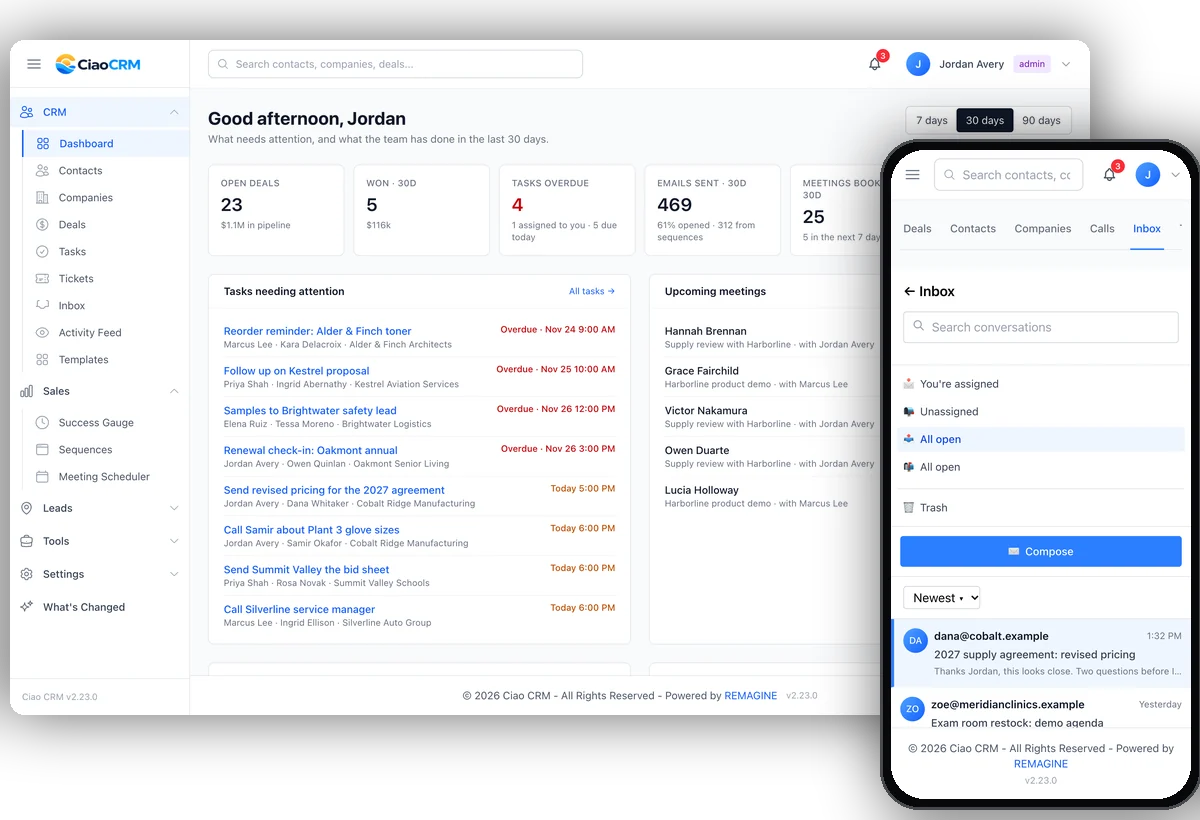
Dashboard
The Whole Team at a Glance
Open and won deals, overdue tasks, emails sent, meetings booked and bounces for the last 7, 30 or 90 days, with what needs attention next and what each person on the team has done.

Every customer, every conversation, one place.
Ciao CRM™ keeps your contacts, companies, deals and tasks together with the email you send and the meetings you book. Write from your own mailbox, follow up automatically until someone replies, and share a booking link that only offers the times you’re free. It’s invitation-only for now.
Already have an account? Sign in at theciao.app
Eight parts, one system. Each has its own page in Ciao, and every one of them feeds the customer’s timeline.
Ciao does the remembering: who you wrote to, who opened it, who replied, and what happens next.
Send an email from your own mailbox, or enroll people in a sequence: a series of personalized emails, days apart, that goes out on its own.
Opens are tracked, and Ciao checks for replies and bounces every 5 minutes. A reply takes that person out of the sequence, and every email lands on their timeline.
Send a booking link that only offers the times you’re free, and turn every next step into a task with a due date, an owner and a reminder.
A look around a demo organization with made-up people, companies and numbers. Click any screenshot to see it full size.
Open and won deals, overdue tasks, emails sent, meetings booked and bounces for the last 7, 30 or 90 days, with what needs attention next and what each person on the team has done.

Each company keeps its people, its deals, its tickets and one timeline of every email, call, meeting, note and task. Log a call or a note, send an email or enroll someone in a sequence without leaving the page.

Every deal on a board by stage, or in a table you can filter, with its amount, its company and its owner. Move several deals to a new stage or owner at once.

Tasks with a due date and time, an owner, a priority and a queue, tied to the company, contact or deal they’re about. Check one off in a click, keep notes as you go, and see its history.

Step by step, see how many people each email reached, opened and replied to, and who bounced. Personalized for every contact, sent from the enrolling person’s own mailbox.

Choose the meeting lengths, your hours, a buffer between meetings, how much notice you need and how far ahead people can book, and who else joins the meeting.
Ciao fits a phone screen too: look up a contact before a call, check off a task, answer an email or share your booking page, all from your phone’s browser.


Share one link and let people pick a time. Ciao only offers the times that are really open, puts the meeting on the calendar and sends everyone the details.
Write, reply and forward inside Ciao, and it all goes out from your own email account. Every recipient is tracked and every email lands on their timeline, so the whole team knows the last thing anyone said.


Working in Gmail? The Ciao extension for Chrome brings the customer to you: open an email and their Ciao record is beside it.
The records, the outreach, the meetings and the follow-up, in one place and for the whole team.
Each organization is its own private space, with its people, its email accounts and its customers. Give each person the role that fits.
Yours. Ciao sends from the email accounts your team connects, so replies come back to your own inbox. An account can send as more than one address, and you pick which one for each email.
Ciao only records an email as sent once your mail server has accepted it. If it’s refused, you see the reason and your draft stays open. Each email account shows whether it’s sending.
Ciao checks for replies every 5 minutes. A reply takes that person out of the sequence, so they never get the next step, and the reply is counted on the sequence’s results. A bounced address is taken out too, and flagged on the contact.
Yes. Share a booking link and people pick from the times you’re actually free: Ciao checks your Google Calendar, your hours, your buffer between meetings and how much notice you need. The meeting goes on your calendar, with a Google Meet link if you like, and both of you get an email.
Yes. Add co-organizers to a page and it only offers times when everyone is free. The meeting goes onto every calendar, and each person gets the booking email.
Yes. Every confirmation email has a link to cancel, with an optional reason, or to pick a new time from the open slots. The calendar event moves or comes off, and both sides are told.
Yes. Import contacts from a CSV file exported from any spreadsheet: name, email, title and company. Anyone already in Ciao is recognized by their email address, so you don’t get duplicates.
Yes. The Ciao API gives your other tools the dashboard numbers, contacts, deals, tasks, meetings and sequence results, and can create and change booking pages. Each key belongs to one organization and only gets the scopes you tick.
Yes. Ciao sends from Gmail and Google Workspace accounts, and the Ciao Chrome extension brings Ciao into Gmail itself: the sender’s contact, company and email history beside the message, a tracking checkbox when you write, and a desktop alert when someone opens your email.
Yes, in your phone’s browser: the menu folds away, tables scroll and detail pages stack, so you can check a contact or a task between meetings.
Not yet. Ciao CRM is invitation-only for now. Request an invite, tell us about your team, and we’ll be in touch when there’s room. Already have an account? Sign in at theciao.app.
Ciao CRM is invitation-only for now. Tell us about your company and your team, and we’ll be in touch when there’s room