Intelligent Residential Control

IRCTRL: Intelligent Residential Control

Your whole home, one screen.

IRCTRL, short for Intelligent Residential Control, brings the lights, climate, energy, pool, irrigation and security of your home together on one screen. Switch a room off with one tap, see the generator is ready and the tank is full, and put the whole house on a tablet on the wall. It runs on your own hub, at home. It’s invitation-only for now.

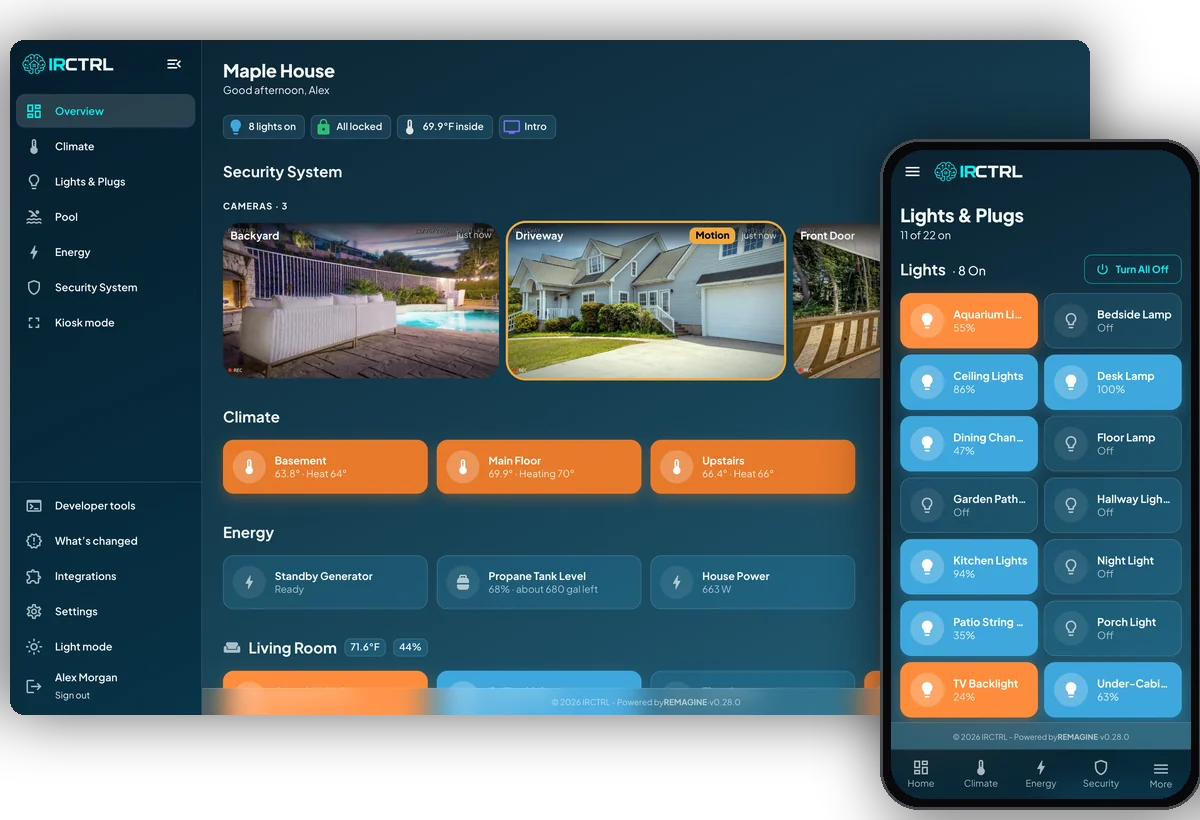
IRCTRL on a computer showing an example home’s Overview, and on a phone showing Lights & Plugs
OneScreen for the Whole Home
LocalControl on Your Network
21″–32″Touch Screen Kiosks
OpenAPI for Your Own Devices
Room by Room

Intelligent Residential Control, Inside and Out

The porch light, the thermostat, the front door lock and the patio lights, all known to one hub and all on one screen.

An illustrated house at dusk with its windows lit, a porch light, path lights and string lights on the patioPorch LightOnThermostatHeat 70°Front DoorLockedGarage DoorClosedTV BacklightBluePatio String Lights35%
Features

Everything in the House, Together

One place for the things you’d otherwise open a different app for, organized by room.

One Overview

Every room on one screen, with one tile per device and the temperature and humidity of each room.
Lights & Plugs

Every light, wall switch and plug in the house, how many are on, and Turn All Off for each kind.

Climate

Thermostats with setpoints and modes, plus room sensors to see which rooms run warm or damp.

Energy

Utility bills by year and bill, live power readings, and the standby generator’s status.

Fuel Tanks

How full the tank is, drawn as a gauge, and flagged when it runs low.

Pool

Pump, heater, salt chlorinator and robot cleaner on one page, each with its status.

Irrigation

Run, stop or suspend watering zones, see the programs, and find each zone on a map of the yard.

Security

Camera pictures on the Overview, live view on all at once, plus door, window and motion sensors and locks.

Kiosk Mode

A full-screen view for a 21″ to 32″ touch screen on the wall (larger on request), with a big clock and one-tap room filters.

History

Every change is recorded, so you can look back at temperatures, levels and what turned on when.

Manual Devices

Equipment that can’t connect still gets its card; fill in its readings by hand or from a script.

On Your Phone

The whole house in your phone’s browser, with a tab bar for Home, Climate and Energy.
Take the Tour

See IRCTRL at Work

A look around IRCTRL with an example home. Click any screenshot to see it full size.
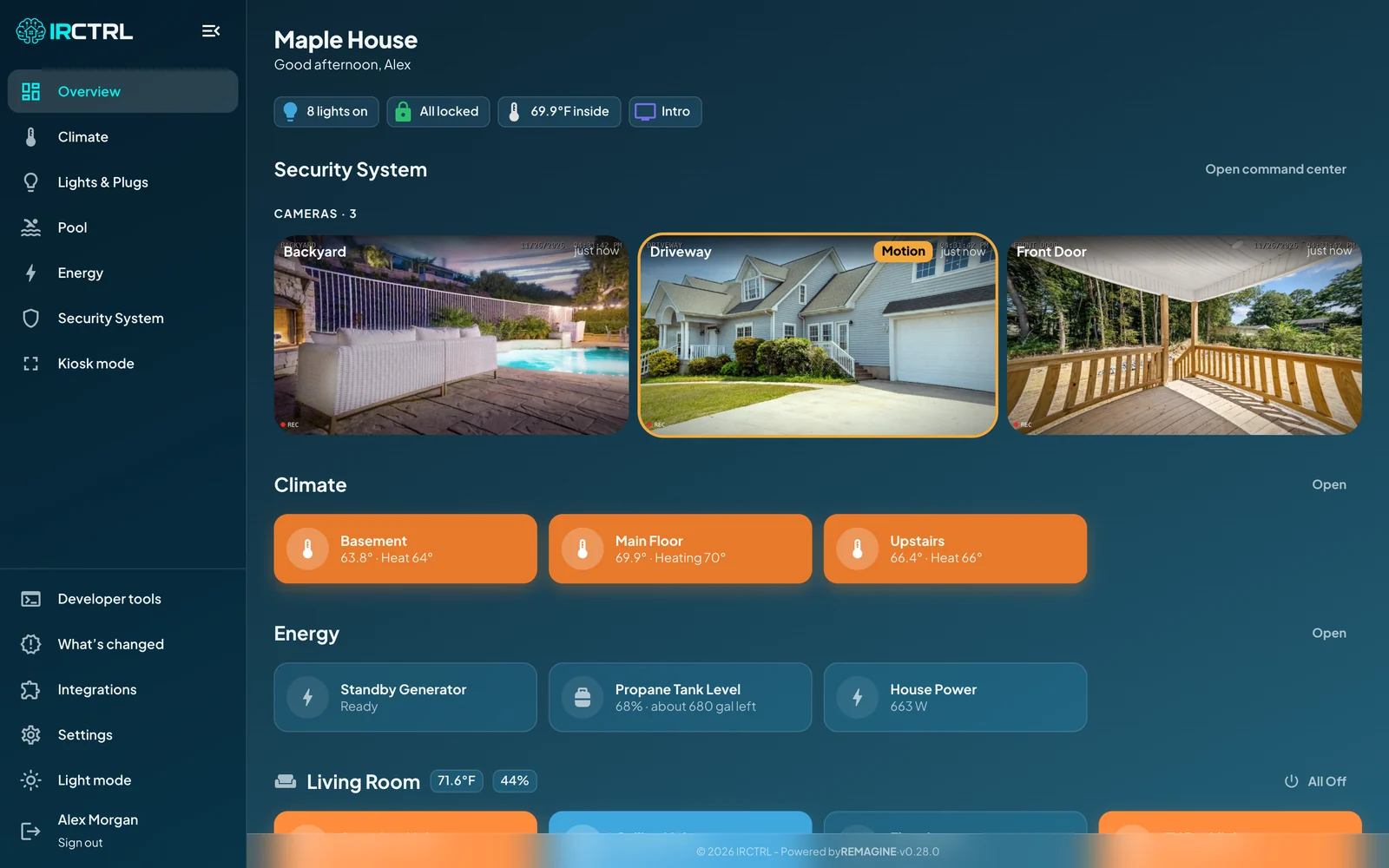
The IRCTRL Overview for an example home: the thermostat, a standby generator, a propane tank and house power, then the Living Room’s lights, TV and sensors
Overview

Every Room at a Glance

The Overview puts the whole house on one screen: climate and energy up top, then every room with its lights, plugs, sensors and media. One tile per device; tap the icon to switch it, tap the tile for everything else. Each room shows its temperature and humidity, and turns everything off with one tap.
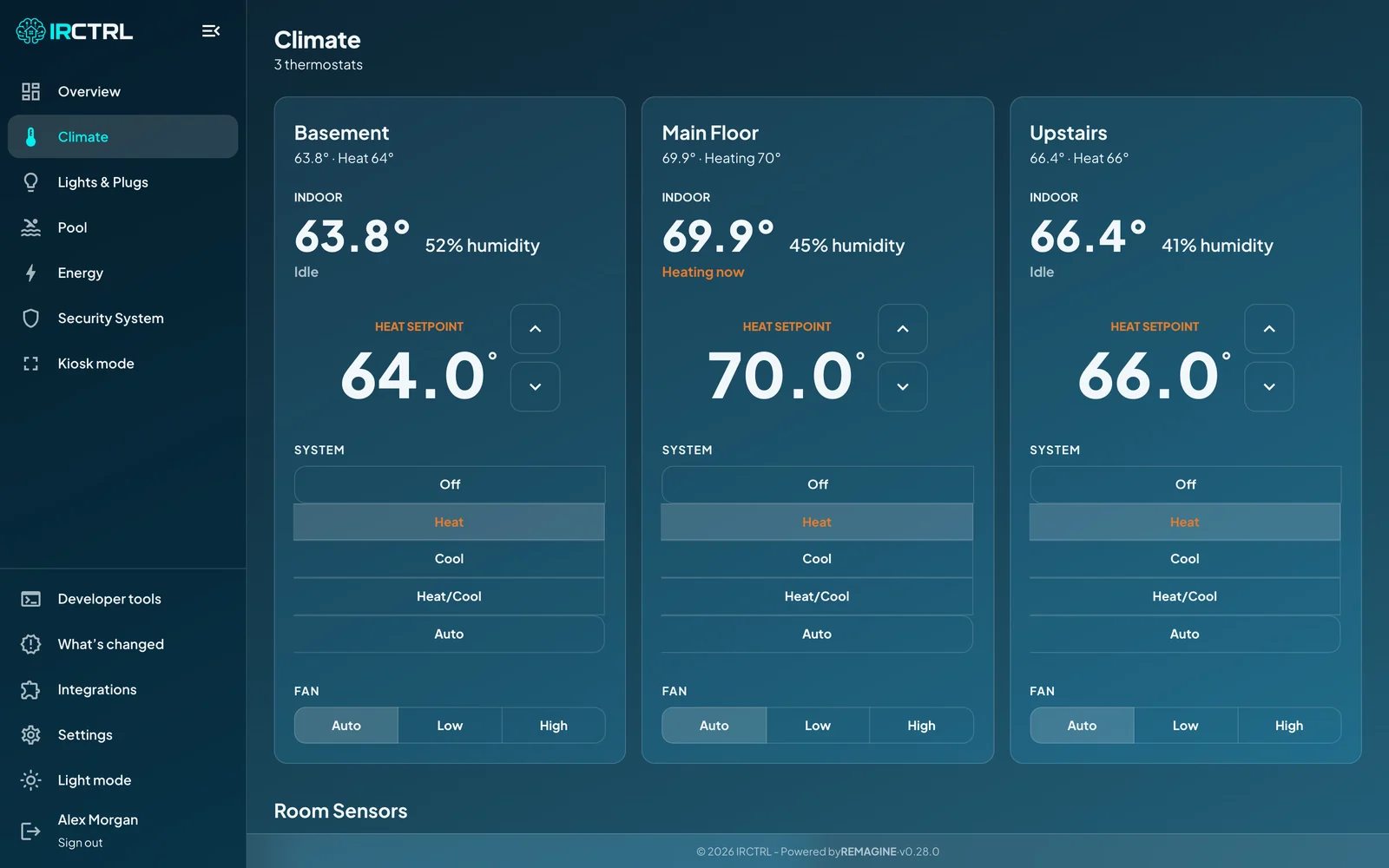
The Climate page: three thermostats side by side, the Basement heating to 64 degrees, the Main Floor heating to 70 and Upstairs idle at 66, each with its system and fan modes
Climate

Comfort You Can See

Every thermostat in the house side by side, with the indoor temperature, humidity and what each system is doing right now. Nudge the setpoint, switch between heat, cool and auto, or change the fan, from any screen in the house. Room sensors sit underneath, so you can see which rooms run warm or damp.
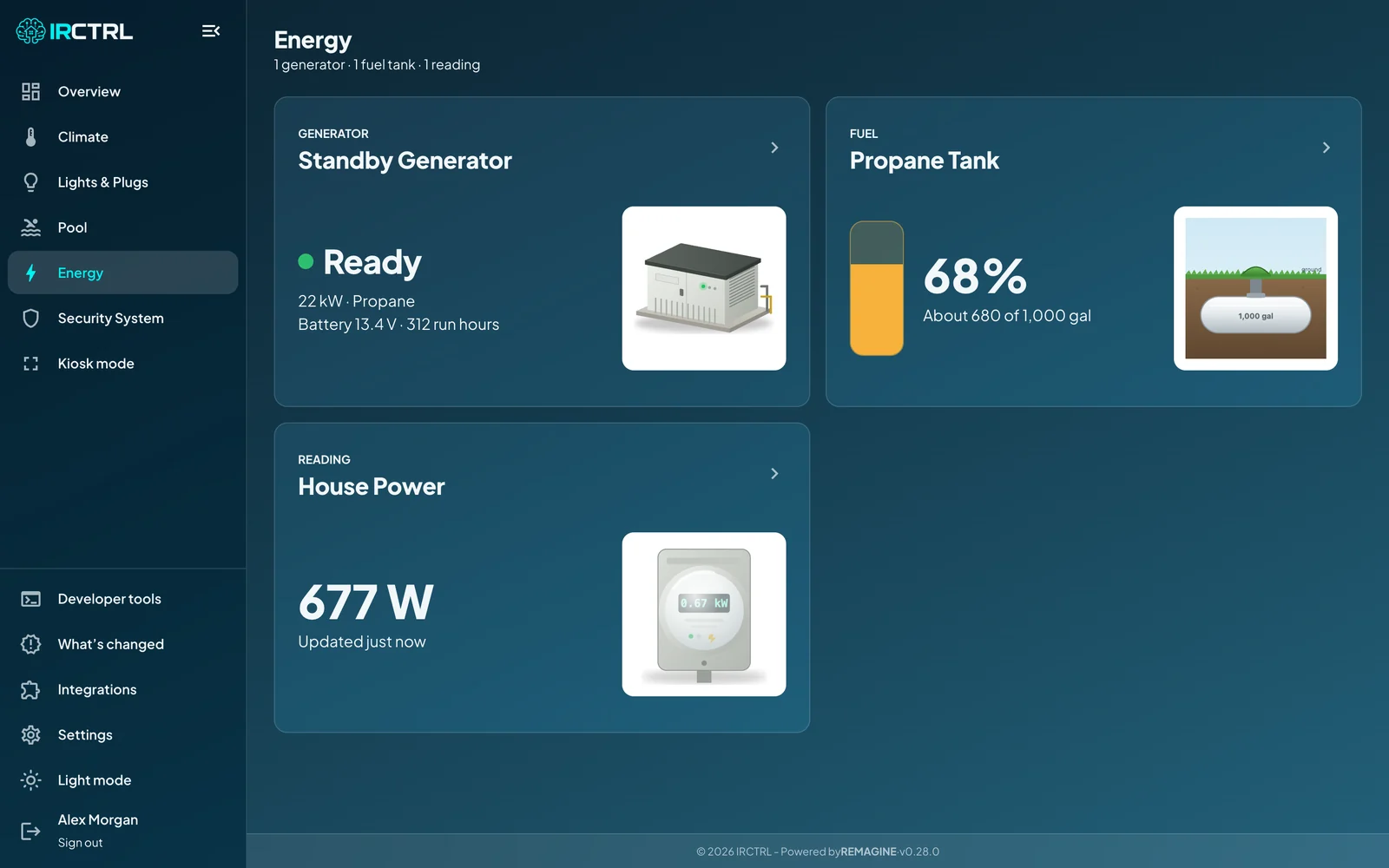
The Energy page: a standby generator Ready, a propane tank at 68 percent with about 340 of 500 gallons, and house power in watts
Energy

Power, Fuel and Backup

A big card for each thing that keeps the house running: the standby generator with its status, battery and run hours, the fuel tank with how much is left, and live power readings. Utility bills come in by year and by bill, so you can see where the money goes.
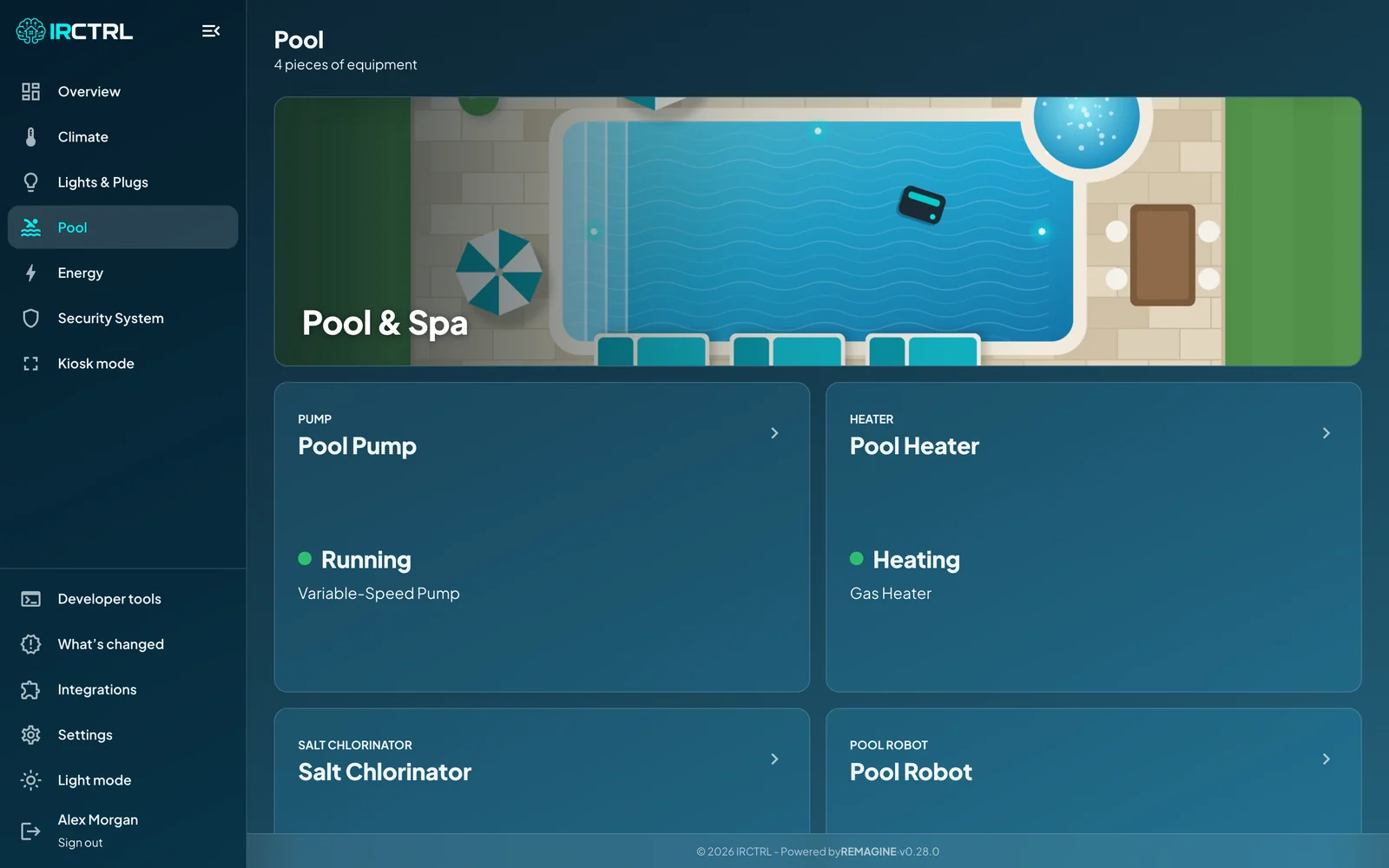
The Pool page: a Pool & Spa banner over the pool pump running, the heater heating, the salt chlorinator and the robot cleaner
Pool

The Pool, Without the Trip Outside

Pump, heater, salt chlorinator and robot cleaner on one page under a picture of your pool, each with its status and details. Equipment IRCTRL can’t talk to yet still gets its card: enter readings by hand and they sit right beside the connected ones.

On Your Phone

The House in Your Pocket

On a phone, IRCTRL has a tab bar for Home, Climate and Energy, with everything else under More. Tiles sit two to a row, sized for a thumb.

IRCTRL on a phone: the Overview with climate, energy and the Living Room
Overview
IRCTRL on a phone: Lights & Plugs with eight lights on
Lights & Plugs
IRCTRL on a phone: the thermostat with its setpoint
Climate
IRCTRL on a phone: the standby generator and the propane tank
Energy
IRCTRL on a phone: the pool banner, pump and heater
Pool
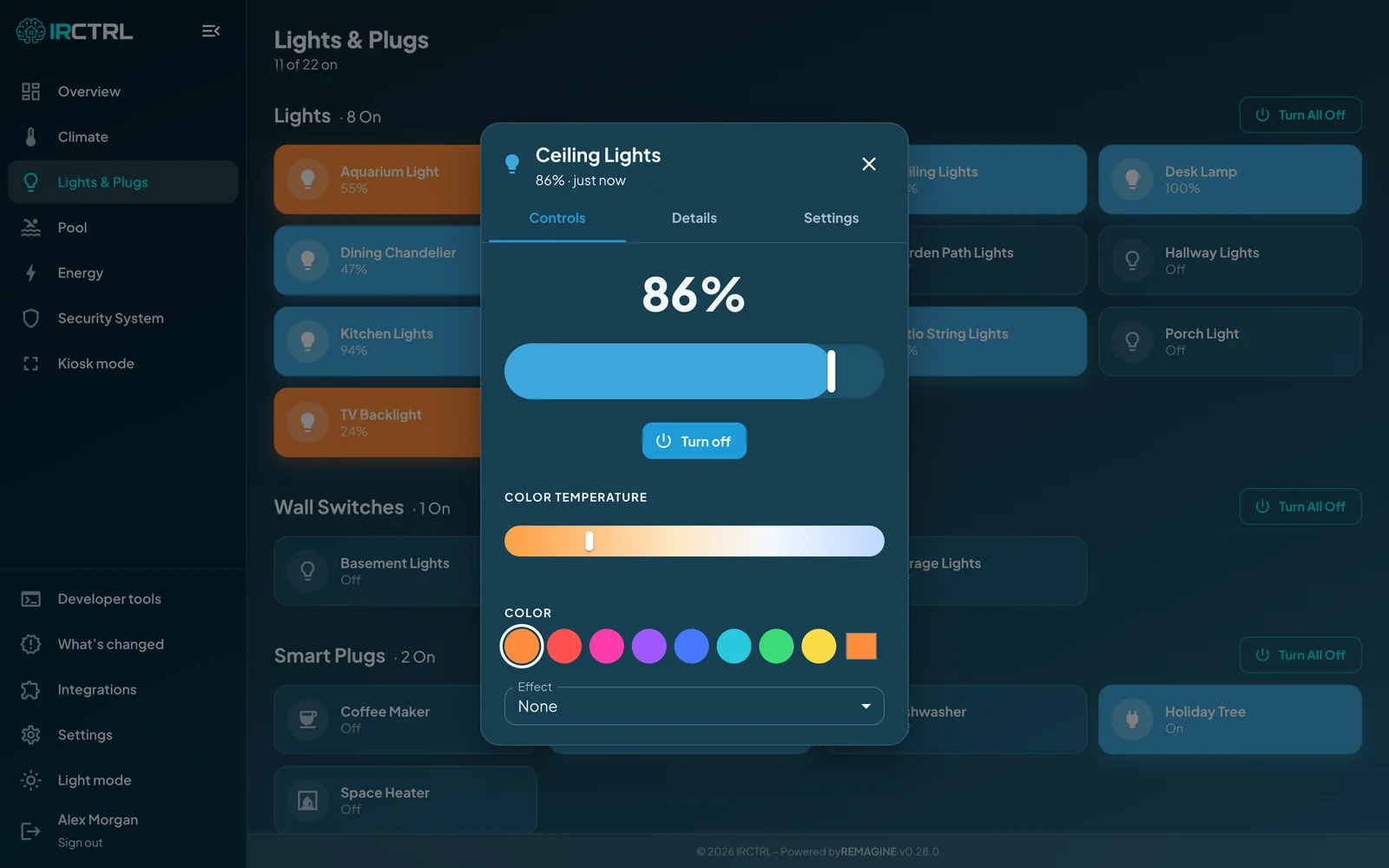
A light’s controls over Lights & Plugs: brightness at 86 percent, color temperature, a row of colors and effects
Lights & Plugs

Every Light in the House

Lights, wall switches and smart plugs, each in its own group with how many are on. Tap a tile’s icon to switch it, or open it for the rest.

  • Brightness and WarmthA big slider for brightness and another from warm candlelight to cool daylight.
  • Colors and EffectsOne-tap colors, a full color picker and the bulb’s own effects for color lights and strips.
  • Turn All OffFor lights, wall switches and plugs, and for each room on the Overview.
  • Switches and PlugsWall switches and plugs sit in their own groups: the coffee maker, the holiday tree, the dehumidifier.
  • Waiting to ConnectDevices you already have in other apps are listed by room until IRCTRL finds them on your network.
Lights & Plugs

The Whole House, Lit Up

Lights, wall switches and plugs from an example home: eleven of twenty-two on, in their groups.
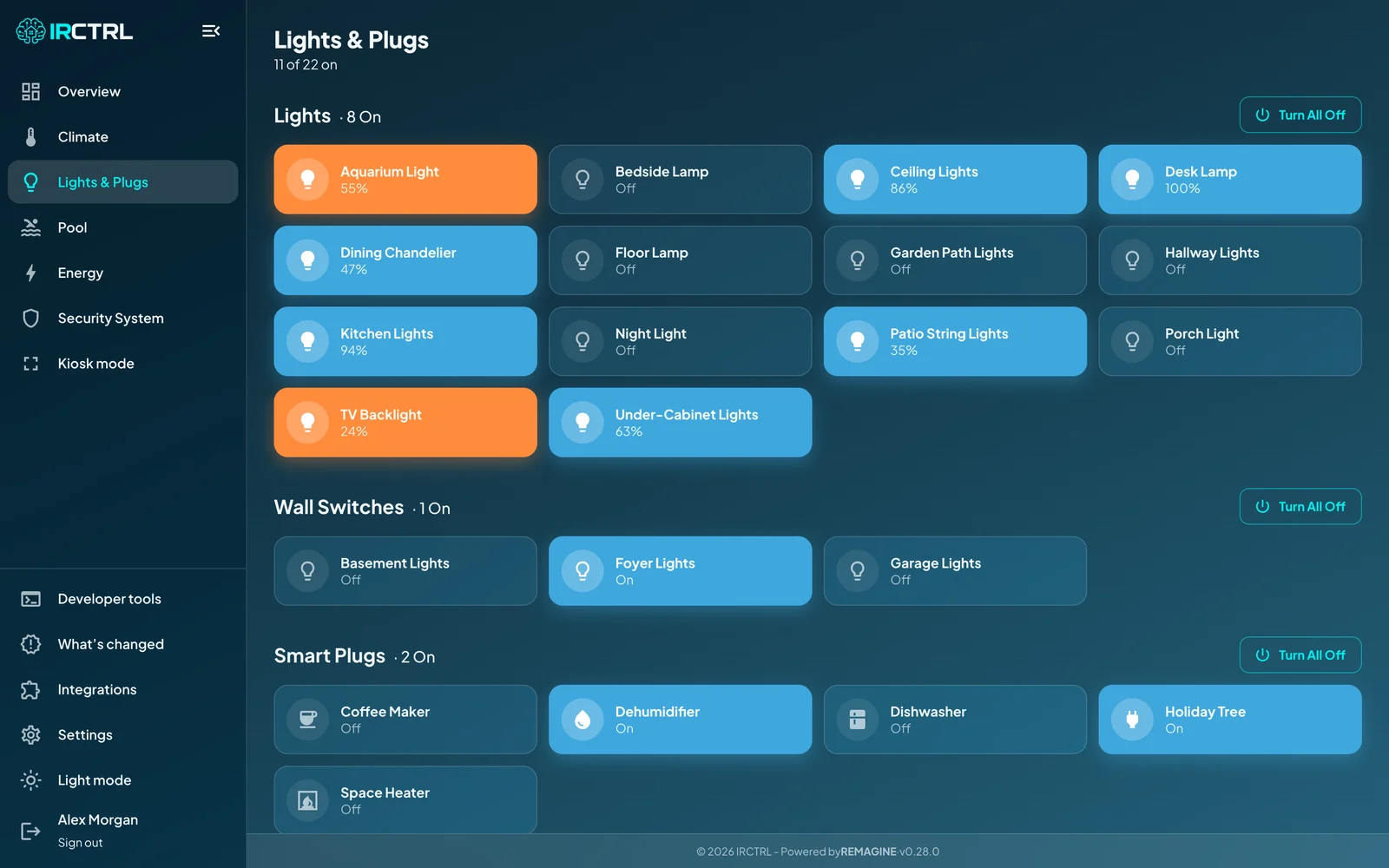
Lights & Plugs: fourteen lights, three wall switches and five smart plugs, with Turn All Off for each group
Out Back

The Pool and the Yard, Too

Outdoor equipment gets the same care as the lights: the pool’s pump, heater and chlorinator, and every watering zone in the yard.
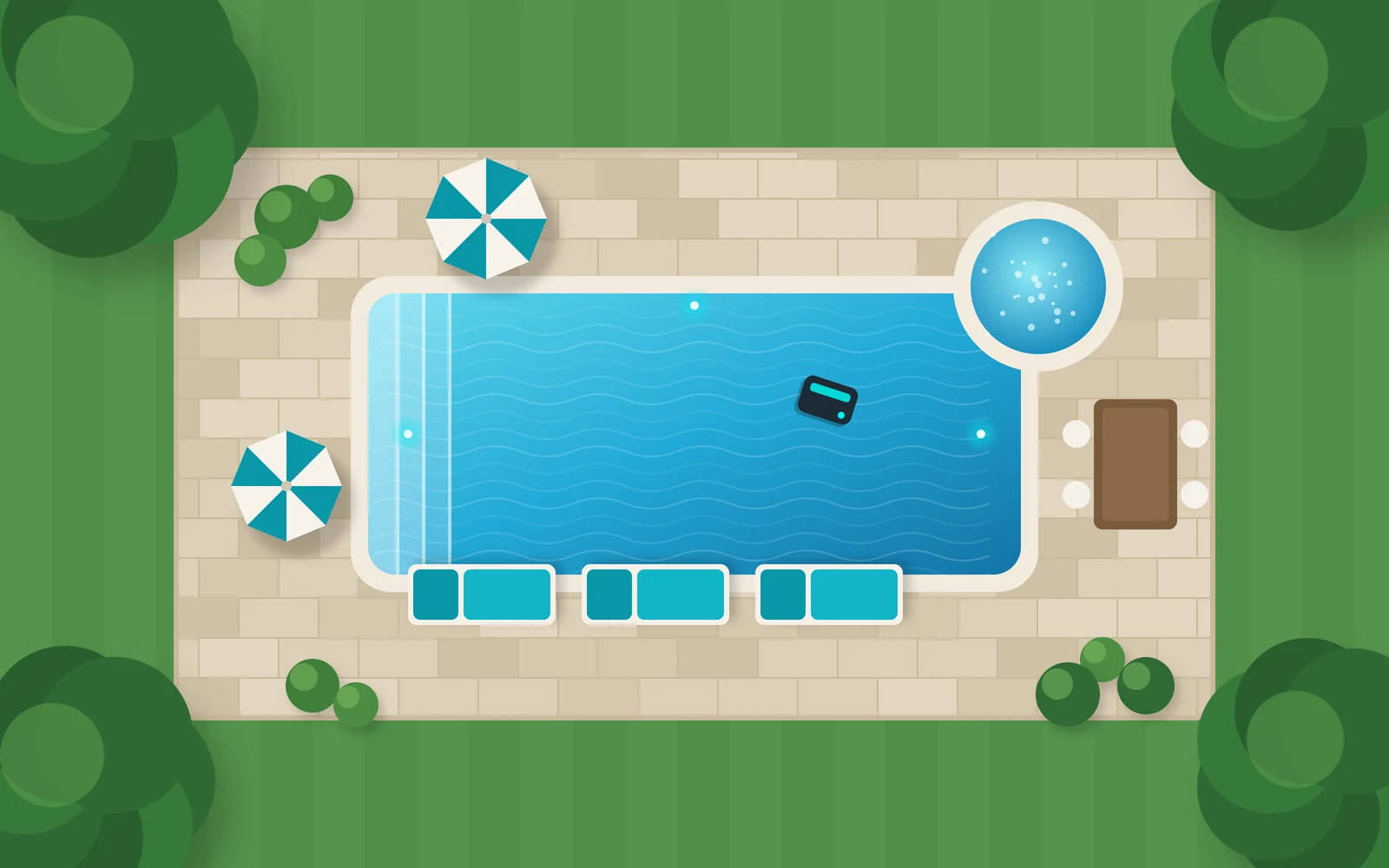
An illustrated pool and spa from above, with loungers, umbrellas and a robot cleaner in the water
Pool & Spa

Your Pool, From Anywhere in the House

  • The pump running or off, and its speed
  • The heater and the water temperature
  • Salt chlorinator output and salt level
  • The robot cleaner’s last and next cycle
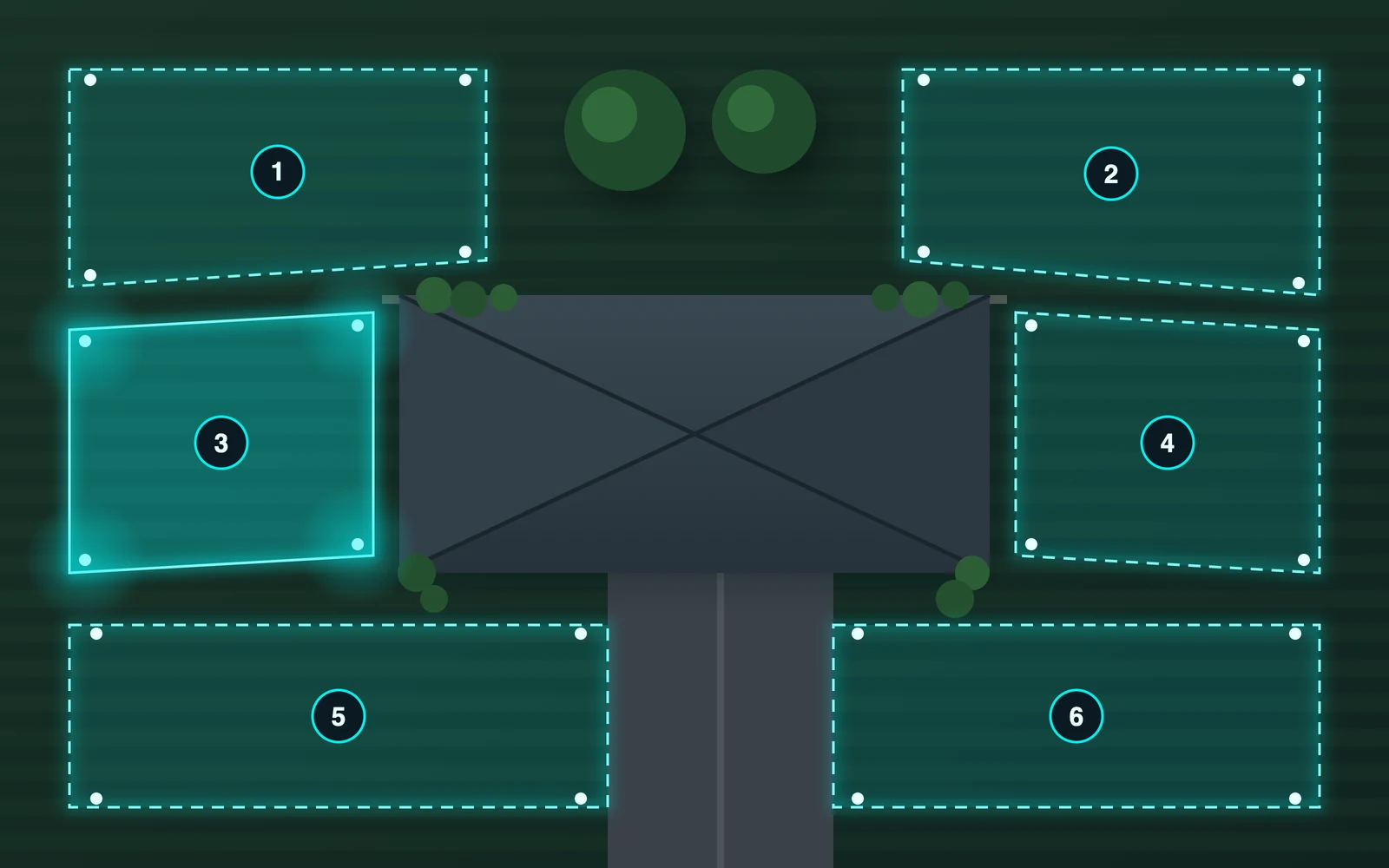
An illustrated yard from above with six watering zones outlined in glowing cyan, zone 3 running
Irrigation

Every Zone on a Map of the Yard

  • Run, stop or suspend each zone
  • Programs and when each zone runs next
  • The running zone glows on the map
  • Notes and heads that need replacing
Kiosk Mode

Made for the Wall

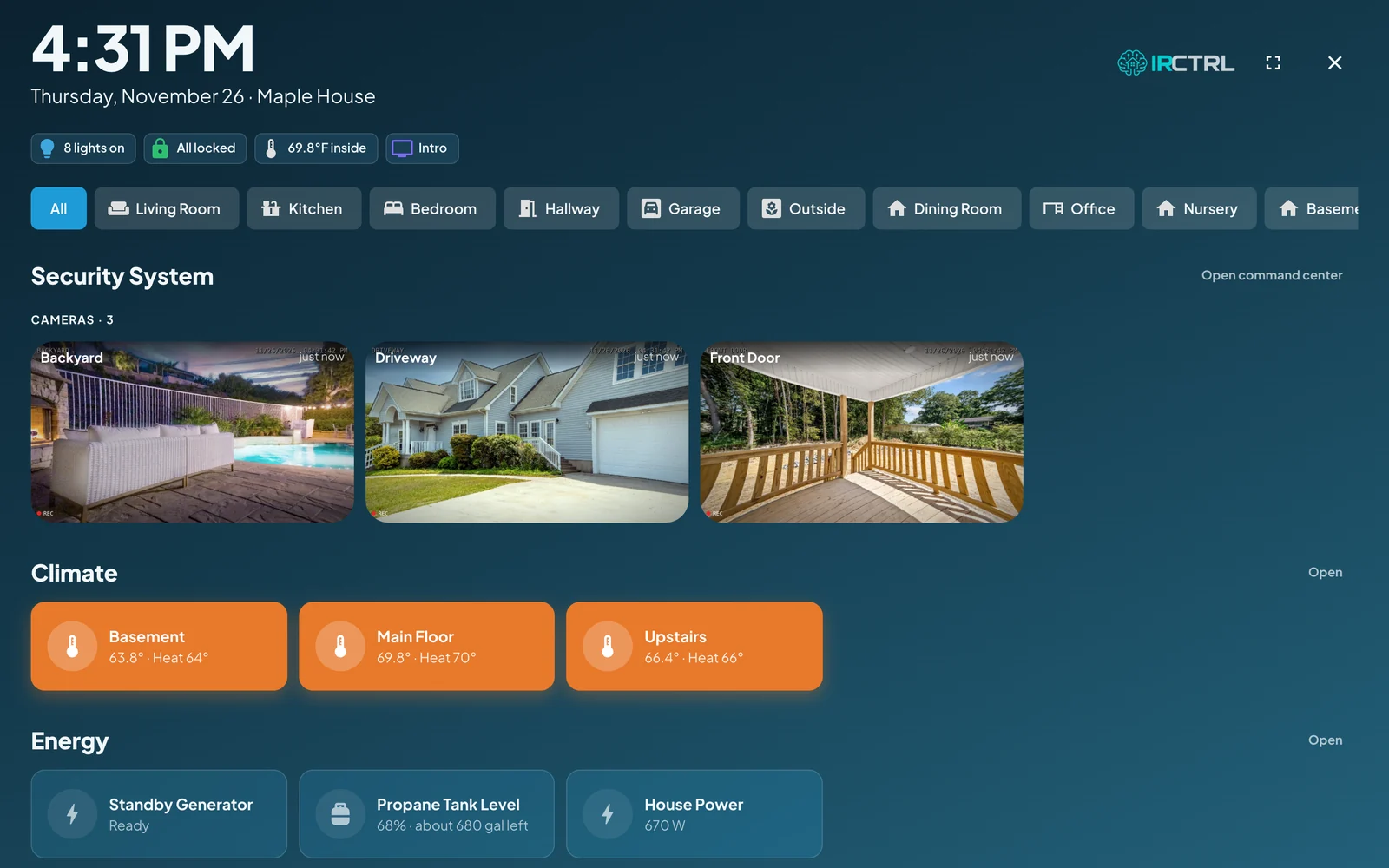
Put an IRCTRL kiosk on the wall or the kitchen counter and it becomes the house’s control panel: a big clock and the date, the security cameras, the whole home below, and a button for each room. Our kiosks come with 21-inch to 32-inch touch screens, and larger on request.
21″ to 32″ Touch ScreensLarger on Request
Kiosk mode on a tablet: the time and date, room buttons, the backyard, driveway and front door cameras with motion on the driveway, then climate and energy

A Clock Across the Room

The time and date big enough to read from the other side of the kitchen.

Room Buttons

One tap to see just the kitchen, the bedroom or the garage, and back to the whole house.

Cameras Up Top

The latest picture from every camera, with motion called out, ahead of everything else.

At-a-Glance Chips

How many lights are on, whether the doors are locked, the inside temperature and what’s playing.
Integrations

How IRCTRL Connects

Four ways in, picked for each device: directly on your network wherever possible, the maker’s official API next, and your own account where a service has no public API.

On Your Home Network

Bulbs, plugs and monitors that can be controlled on your Wi-Fi are reached directly, with nothing in between. They answer right away, even when the Internet is down.

Official Cloud APIs

For devices that live in their maker’s cloud, IRCTRL uses the maker’s published API with a key from your own account.

An Open API

IRCTRL has its own REST API and a real-time WebSocket, so your scripts, sensors and custom devices can read states, call services and send readings.

Works With

  • KasaSmart plugs, switches and bulbs
    Local
  • TapoSmart plugs, switches and bulbs
    Local
  • WiZSmart bulbs and lights
    Local
  • GenmonStandby generator monitor
    Local
  • GoveeLights, plugs and room sensors
    Official API
  • Smart Life (Tuya)Lights, switches and plugs
    Official API
  • HydrawiseIrrigation controllers
    Official API
  • Honeywell Total Connect ComfortWi-Fi thermostats
  • RingDoorbells, cameras, alarm and smoke/CO
  • EversourceElectric bills and usage
  • Manual DevicesGenerators, fuel tanks, pool equipment
    Open API
  • REST & WebSocket APIYour scripts and custom devices
    Open API
  • System MonitorThe hub’s own health
    Local
  • SmartThingsDevices linked to SmartThings
    Coming Soon
  • And Many MoreMore integrations on the way, and anything you can script through the open API

On the Roadmap

Next up, so more of the home joins in. Matter comes first, so Matter devices can be shared with IRCTRL alongside the apps you already use.

  • Matter
  • MQTT
  • ESPHome
  • Zigbee & Z-Wave
  • Shelly
  • Hue
  • Sonos & Cast
  • ONVIF Cameras
  • Automations
  • Notifications

Product and company names are trademarks of their owners. IRCTRL is not affiliated with or endorsed by them.

The Difference

Intelligent Residential Control, Kept at Home

IRCTRL runs on a hub in your house, and it talks to your devices directly wherever it can.

Local First

Devices that can be controlled on your home network are, so they answer right away, even when the Internet is down.

Private by Design

Your history, rooms and settings stay on your hub, and service passwords are stored encrypted.

Open to Your Devices

A REST API and a real-time WebSocket, so the things you build can join the house too.

Things That Matter

The generator, the fuel tank and the pool heater get the same attention as the lights.

One Tile per Thing

Each device is one tile; its extra readings live inside, so the screen stays calm.

No App Store Needed

It runs in the browser on any phone, tablet or computer, in light or dark mode.
Specifications

What It Covers

Lights & Plugs
Smart bulbs, light strips, wall switches and plugs: on and off, brightness, color temperature, colors and effects, with Turn All Off for each kind
Access
Invitation-only for now
Climate
Thermostats (setpoints, heat, cool and auto modes, fan) and room temperature and humidity sensors
Energy
Utility bills by year and bill, standby generator status, fuel tank levels and live power readings
Pool
Pump, heater, salt chlorinator and robot cleaner, connected or entered by hand
Irrigation
Watering zones with run, stop and suspend, programs, and a map of the yard with each zone marked
Security
Cameras with snapshots and live view, door, window and motion sensors, and locks
Kiosk Mode
A full-screen view for a wall or countertop screen: a big clock, the date, the cameras and one-tap room filters
Kiosk Screens
IRCTRL kiosks with 21-inch to 32-inch touch screens; larger on request
History
Every change is recorded, so you can look back at temperatures, levels and what turned on when
Connections
Local control on your home network where devices allow it, makers’ official APIs, and your own accounts for services with only a website
Open API
A REST API and a real-time WebSocket (states, events, services), signed in as one of your IRCTRL users
Privacy
Runs on a small always-on computer in your home; passwords for connected services are stored encrypted
FAQ

Questions Before You Connect

What does IRCTRL connect to?

Today: Kasa, Tapo and WiZ lights and plugs on your home network; Govee and Smart Life devices and Hydrawise irrigation through their official APIs; Ring doorbells, cameras and alarms, Honeywell Total Connect Comfort thermostats and Eversource electric bills through your own accounts; and standby generators through Genmon. SmartThings is coming soon. Each is added once in Integrations, and its devices appear in their rooms on their own.

Does it work with Matter?

Not yet. Matter is on the roadmap, so Matter devices can join IRCTRL alongside the apps you already use. Until then, many of the same devices work through their maker’s integration.

Can I connect my own devices?

Yes. IRCTRL has a REST API and a real-time WebSocket: a script, a sensor you built or another system can read every state, call services like turning a light on, and send readings for manual devices.

Does it need the Internet?

Not for devices that can be controlled on your home network: IRCTRL talks to them directly. Devices that only work through their maker’s service, like most thermostats and utility accounts, need the Internet to update.

Where does my data live?

On the IRCTRL hub in your home. Your history, rooms and settings stay there, and passwords for the services you connect are stored encrypted. Nothing leaves it except what the services you connect need.

Can I put it on the wall?

Yes. Our IRCTRL kiosks come with 21-inch to 32-inch touch screens, and larger on request, or use a tablet you already have. Kiosk mode fills the screen with a big clock, the date, the cameras and the whole house, with a row of room buttons to jump straight to the kitchen or the garage.

What about equipment that can’t connect?

Add it as a manual device. A generator, a fuel tank or pool equipment gets the same card as a connected one, and you fill in its readings by hand or send them from a script.

Can anyone sign up?

Not yet. IRCTRL is invitation-only for now. Request an invite, tell us about your home, and we’ll be in touch when there’s room.

Ready for Intelligent Residential Control?

IRCTRL is invitation-only for now. Tell us about your home and what you’d like to connect, and we’ll be in touch when there’s room


More Products

More From REMAGINE

Products designed, built and run by the same team.

Nomos GRC logoGnosys Hub logoCiao CRM logoPiddx logoArtifx logoShoutVector logoRSQ Desk logoF-StopIQ logoWakeGrid logoREMAGINE Analytics logoClanKiosk logoIANTERNET Bartender logo