Asset Management

Artifx

Know who has what.

Artifx™ keeps track of everything your company owns and pays for: every device and access card, where it is and who holds it, the software your people can use, and the subscriptions you pay for and when they renew. Onboard and offboard without losing track, and see the full history of every item. It’s invitation-only for now.

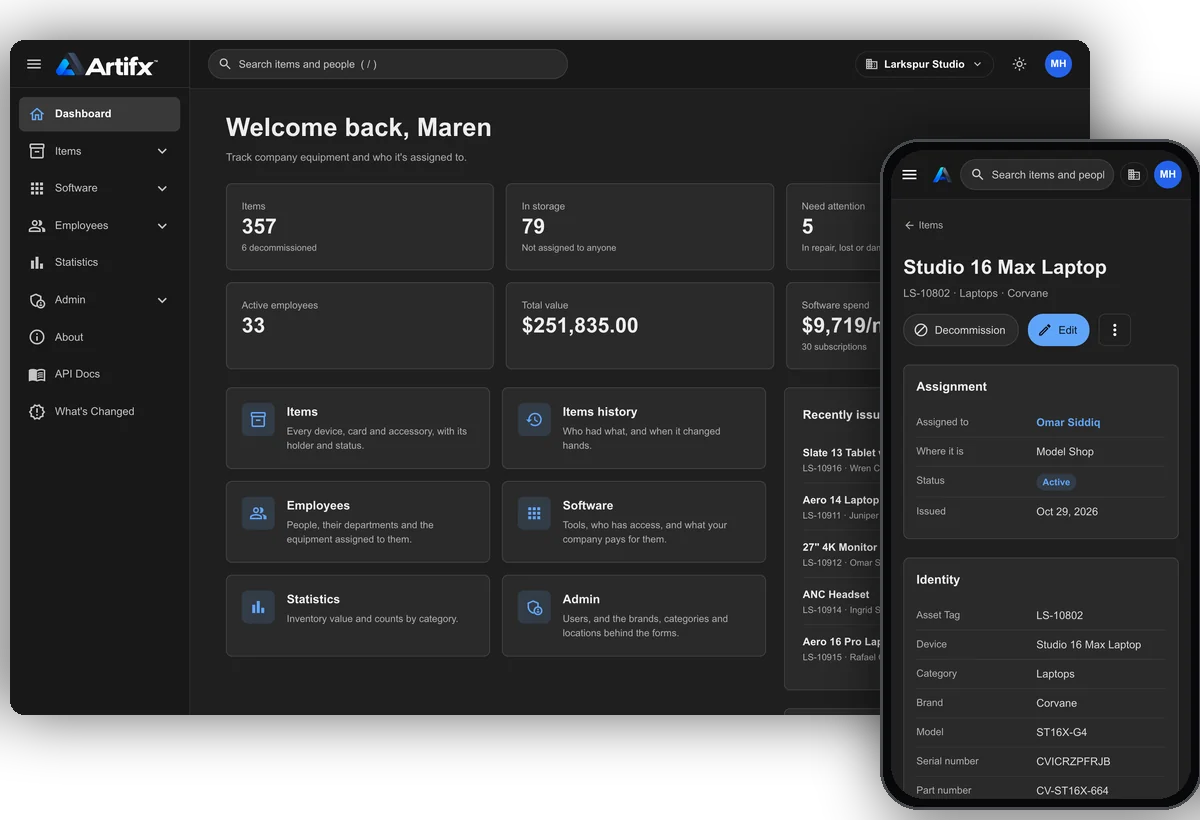
Artifx on a computer showing the dashboard for a demo company, and on a phone
Every ItemWho Has It and Where It Is
RenewalsSeen Before They Charge
HistoryWho Had What, and When
ExcelExport Any List
How It Works

Add It, Assign It, Get It Back

From a new laptop’s first day to its last.

  1. 1. AddEverything You Own and Pay For

    Devices and access cards with their asset tags, categories, brands and photos; the software your people use; and every subscription with its billing cycle and renewal date.

  2. 2. AssignHand It Out

    Assign items to people, record the room or storage place they sit in, and give people access to the tools they need. Every change goes into the item’s history.

  3. 3. Get It BackOffboard Without Losing Track

    When someone leaves, the offboarding checklist walks through their equipment and software access, so nothing walks out the door and nobody keeps a login they shouldn’t.

Take the Tour

See Artifx at Work

A look around a demo company with made-up people, devices and numbers. Open any screenshot to see it full size.

The Artifx dashboard for a demo company, with sample data: 357 items, 79 in storage, 5 needing attention, 33 active employees, total value, software spend and recently issued items
Dashboard

The Whole Company at a Glance

How many items you have, what’s in storage and what needs attention, active employees, total value and software spend, with what was recently issued and what renews soon.

The Artifx item list for a demo company, with sample data: the searchable category picker open with a count for each category
Items

Every Device, Easy to Find

Pick a category from the searchable list, with counts, then search and sort. Export the list to Excel whenever someone asks for it.

An Artifx item page for a demo company, with sample data: a laptop assigned to an employee, kept in the model shop, with its asset tag, serial number, photo and history
Item Page

One Page for Each Item, With Its History

The details, the photo, who has it and where it sits, and a readable history: who had it, when it moved, when its tag was replaced.

An Artifx employee profile for a demo company, with sample data: details, software access with Give access, and 12 assigned items with Assign item and Return
Employees

Everything a Person Holds

Each employee’s profile lists the items assigned to them and the software they can use. Assign or return items right there.

The Artifx software list for a demo company, with sample data: tools with their category, number of people, cost per year and next renewal
Software

Who Has Access to Which Tools

The tools the company uses, who has access to each, what each costs a year and when it next renews.

Artifx statistics for a demo company, with sample data: total value, item count, oldest and newest items and value by category
Statistics

The Numbers Behind Your Inventory

Total value and item count, your oldest and newest equipment, and value by category, so you can see where the money is.

On Your Phone

Look It Up Wherever You Are

Artifx fits a phone screen too, with lists that turn into cards: check who has an item or what a person holds from the storage room or the front desk.

Artifx on a phone, sample data: the dashboard
Dashboard
Artifx on a phone, sample data: the item list as cards with the category picker
Items
Artifx on a phone, sample data: an item page
Item
Artifx on a phone, sample data: an employee’s assigned items
Employee
The Artifx inventory board for a demo company, with sample data: one employee’s 12 items in one column and the IT closet’s 47 in the other
Inventory Board

Move Equipment With a Drag

The inventory board lays out who holds what, person by person, with storage alongside. Hand a laptop to someone new by dragging it across.

  • Drag and DropMove items between people and storage, and group related items together.
  • Where It SitsRecord the room or storage place as well as the person, so you can find it.
  • Every Move RecordedEach assignment and return goes into the item’s history, in plain words.
  • Decommission, Don’t DeleteRetire a device with a reason and keep its record, or return it to service later.
Subscriptions

No More Surprise Renewals

Every subscription the company pays for, with what it costs and when you have to decide, so nothing renews without someone choosing to keep it.

  • Billing CyclesFrom weekly to every three years, with the cost per month and per year side by side.
  • Renew and Cancel-By DatesThe next renewal and the last day to cancel, with what’s coming up on the dashboard.
  • Grouped by ProviderKeep each domain, seat or plan under the provider it’s billed by.
  • Export to ExcelHand finance the list in the format they want.
The Artifx subscriptions list for a demo company, with sample data: monthly and yearly totals, renewing soon, and each subscription’s cost, renewal and cancel-by date, with domains grouped together
Features

Everything You Need to Keep Track

From the first asset tag to the last day of a subscription.

Items and Access Cards

Asset tag, category, brand, photo, holder and location for every device and card.

Find Anything

A searchable category picker with counts, sorting, and a global search across items and people.

Replace a Tag

Record a new asset tag sticker and keep the old number in the record and its history.

Offboarding Checklist

Deal with a leaver’s equipment and software access, step by step, and keep their history.

Departments

Teams in a list or as cards, each with its own icon.

Brands, Categories and Places

Brands with their logos, and categories and storage locations with icons, set up by your admins.

Excel Export

Any list, ready for finance, an auditor or an insurance form.

Invites and Admin Rights

Invite people by email, with admin rights per company and password reset by email.

Read-Only API

Your other apps can read the dashboard figures and statistics with keys your admins control.

Light and Dark

Dark by default, light when you prefer it, and layouts made for phones.

Nothing Lost by Accident

Deleting hides a record rather than erasing it.

More Than One Company

Each company’s data kept completely separate, with a switcher for people in more than one.
People

Built Around the People Who Hold Things

Equipment and access follow people in and out of the company. Artifx follows them too.

OnboardAssign items and software access on day one
ActiveEverything each person holds, on their profile
OffboardA checklist for equipment and access
HistoryWho had what, and when, kept for good
Specifications

What It Does

Website
artifx.app
Items
Devices and access cards with asset tag, category, brand, photo, holder, location and history
Finding Items
Searchable category picker with counts, search, sorting, global search across items and people
Location
The room or storage place an item sits in, recorded separately from the person who has it
Decommissioning
Disposed, recycled, sold, donated, returned to vendor, beyond repair, lost, stolen or other, with a date and note; return to service any time
Asset Tags
Replace a tag and keep the old number in the record and its history
Employees
Active, offboarded and deleted, with assigned items, software access and an offboarding checklist
Inventory Board
Drag items between people and storage
Software
Who has access to each tool, annual cost and next renewal
Subscriptions
Billing cycle, cost per month and per year, next renewal and cancel-by date, grouped under their provider
Export
Lists to Excel
Companies
Each company’s data kept completely separate, with a switcher for people in more than one
Users
Email invites, password reset by email, profile photos and per-company admin rights
API
Read-only access to the dashboard figures and statistics for your other apps, with keys your admins make and revoke
Look
Light and dark mode, and layouts made for phones
Deleting
Deleted records are hidden, not erased
Access
Invitation-only for now
FAQ

Questions About Artifx

What is Artifx?

An inventory of everything a company owns and pays for: its devices and access cards, the software its people use and the subscriptions it pays for, with who has what, where it is, what it costs and when it renews.

Who is it for?

Office managers, IT and operations teams, and the people who get asked “who has the spare laptop?” or “when does that renew?” and want the answer in one place instead of a spreadsheet.

Can it tell me where something is, not just who has it?

Yes. An item can be assigned to a person and also record the room or storage place it sits in, and both show on the item, in the list and in the export.

What happens when someone leaves?

Mark them offboarded and the checklist walks through their equipment and software access: return items to storage or hand them to someone else, and remove access to the tools they used. Their history stays.

What about old or broken equipment?

Decommission it with a reason, a date and a note. It leaves the counts and people’s lists but keeps its record, photo and history, and can be returned to service later.

Does it remind me about renewals?

The dashboard shows what renews soon, and every subscription has its next renewal and cancel-by date, so you can decide before it charges.

Can more than one company use it?

Yes. Each company’s data is kept completely separate, and people who work for more than one company switch between them.

Does it work on a phone?

Yes, in your phone’s browser, with a menu and lists made for small screens, so you can look up an item or a person from anywhere.

Can anyone sign up?

Not right now. Artifx is invitation-only for now: request an invite here and we’ll be in touch.

Want Someone to Look After It All?

REMAGINE’s Managed Services and Systems Administration teams keep the servers and systems behind your equipment patched, backed up and monitored.

Ready to Know Who Has What?

Artifx is invitation-only for now. Tell us about your company and what you want to track, and we’ll be in touch

More Products

More From REMAGINE

Products designed, built and run by the same team that delivers our client work.

Nomos GRC logoGnosys Hub logoCiao CRM logoPiddx logoShoutVector logoRSQ Desk logoF-StopIQ logoWakeGrid logoREMAGINE Analytics logoClanKiosk logoIRCTRL logoSaltCue logoIANTERNET Bartender logo